
Docker has revolutionized modern application deployment and infrastructure management. This comprehensive guide covers production-ready Docker practices based on real-world enterprise implementations, focusing on security, performance optimization, and scalable deployment strategies.
Table of contents
- Why Docker Containerization Matters in 2025
- Building Production-Ready Docker Images
- Security Best Practices for 2025
- Advanced Container Orchestration
- Production Deployment Strategies
Why Docker Containerization Matters in 2025
Container adoption continues to surge, with over 90% of organizations using or evaluating container platforms. The container market is experiencing explosive growth at 23.64% CAGR, expected to reach $10.27 billion by 2030. Docker provides consistency across development, testing, and production environments, eliminating deployment inconsistencies while enabling true infrastructure as code.
Key Benefits of Modern Containerization:
- Environment Consistency: Identical runtime across all deployment stages
- Resource Efficiency: Superior utilization compared to traditional VMs
- Rapid Scalability: Horizontal scaling with minimal overhead
- Application Isolation: Secure process and resource separation
- Development Velocity: Accelerated CI/CD pipelines
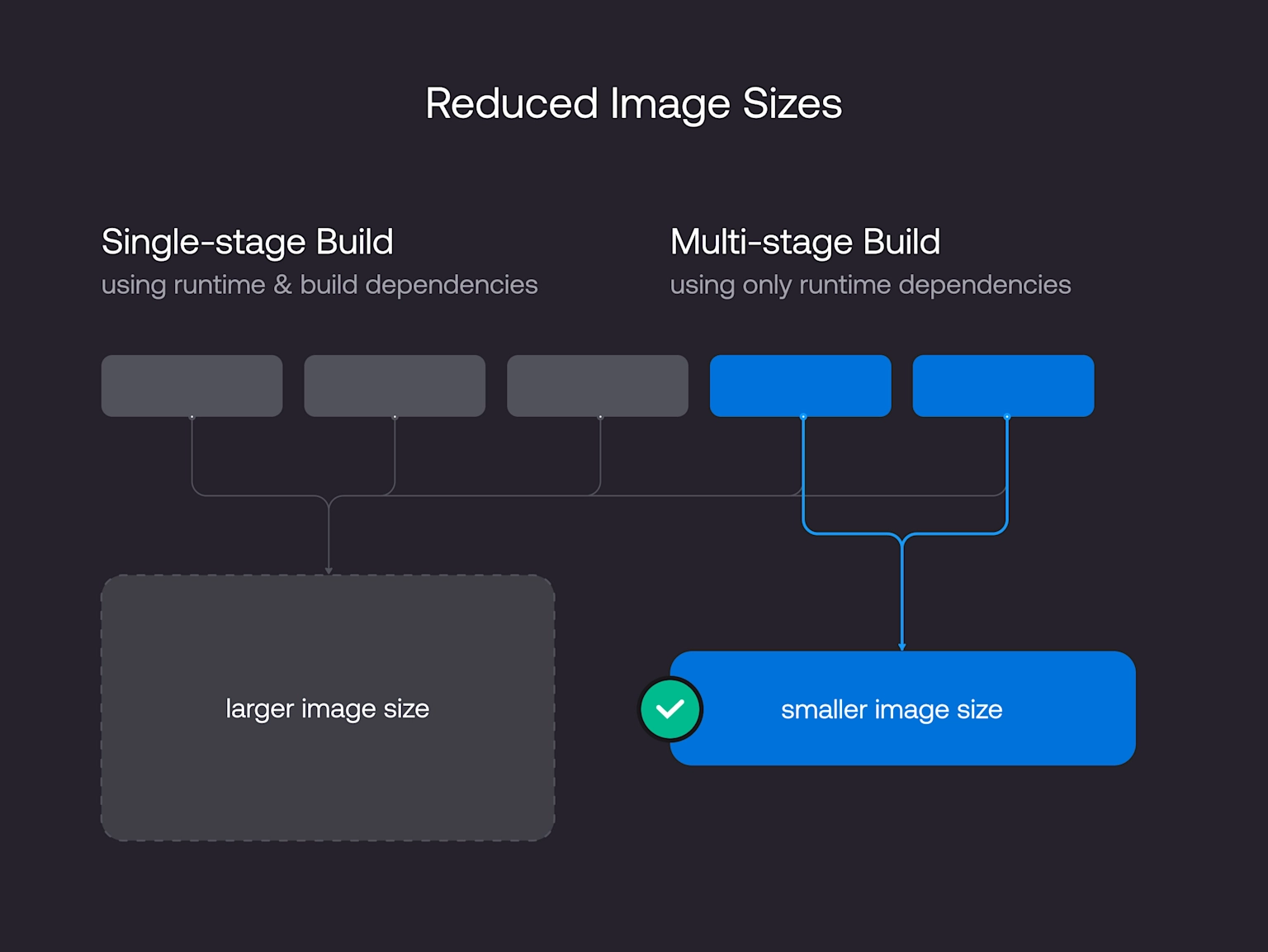
Building Production-Ready Docker Images
1. Multi-Stage Builds
Multi-stage builds are essential for creating optimized production images by separating build dependencies from runtime requirements.
# Build stage
FROM node:18-alpine AS builder
WORKDIR /app
COPY package*.json ./
RUN npm ci --only=production && npm cache clean --force

# Production stage
FROM node:18-alpine AS production
WORKDIR /app
RUN addgroup -g 1001 -S nodejs && \
    adduser -S nodejs -u 1001
COPY --from=builder /app/node_modules ./node_modules
COPY --chown=nodejs:nodejs . .
EXPOSE 3000
USER nodejs
HEALTHCHECK --interval=30s --timeout=3s --start-period=5s --retries=3 \
  CMD node healthcheck.js || exit 1
CMD ["node", "server.js"]
2. Layer Optimization Strategies
Optimize Docker layers for improved caching and reduced image sizes:
# Inefficient - Multiple layers
RUN apt-get update
RUN apt-get install -y curl
RUN apt-get install -y git

# Optimized - Single layer with cleanup
RUN apt-get update && apt-get install -y \
    curl \
    git \
    && rm -rf /var/lib/apt/lists/* \
    && apt-get clean
Security Best Practices for 2025
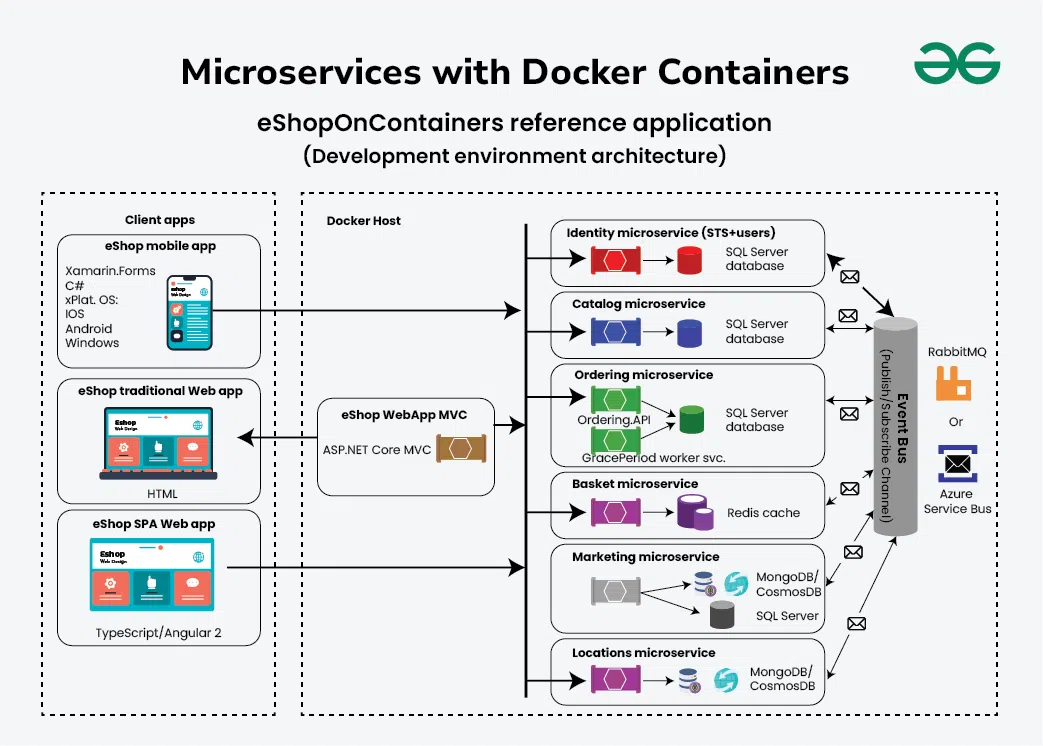
1. Non-Root User Implementation
Running containers as root poses significant security risks. Always implement non-root users in production:
# Create dedicated application user
RUN addgroup -g 1001 -S appgroup && \
    adduser -S appuser -u 1001 -G appgroup

# Set ownership and switch user
COPY --chown=appuser:appgroup . .
USER appuser
2. Vulnerability Scanning Integration
Implement automated security scanning in CI/CD pipelines:
# Trivy vulnerability scanning
trivy image --exit-code 1 --severity HIGH,CRITICAL myapp:latest

# Snyk container testing
snyk container test myapp:latest --severity-threshold=high

# Docker Scout (2025)
docker scout cves myapp:latest
3. Use Minimal Base Images
Reduce attack surface with distroless or Alpine-based images:
# Production distroless image
FROM gcr.io/distroless/nodejs18-debian11
COPY --from=builder /app .
EXPOSE 3000
CMD ["server.js"]
Advanced Container Orchestration
Production Docker Compose Configuration
Modern Docker Compose files emphasize health checks, resource limits, and security:
version: '3.8'

services:
  web:
    build:
      context: .
      target: production
    ports:
      - "3000:3000"
    environment:
      - NODE_ENV=production
      - DB_HOST=postgres
    depends_on:
      postgres:
        condition: service_healthy
    networks:
      - app-network
    restart: unless-stopped
    user: "1001:1001"
    healthcheck:
      test: ["CMD", "curl", "-f", "http://localhost:3000/health"]
      interval: 30s
      timeout: 10s
      retries: 3
      start_period: 40s
    deploy:
      resources:
        limits:
          cpus: '0.5'
          memory: 512M
        reservations:
          cpus: '0.25'
          memory: 256M

  postgres:
    image: postgres:15-alpine
    environment:
      POSTGRES_DB: ${DB_NAME}
      POSTGRES_USER: ${DB_USER}
      POSTGRES_PASSWORD: ${DB_PASSWORD}
    volumes:
      - postgres-data:/var/lib/postgresql/data
    networks:
      - app-network
    restart: unless-stopped
    healthcheck:
      test: ["CMD-SHELL", "pg_isready -U ${DB_USER}"]
      interval: 10s
      timeout: 5s
      retries: 5

volumes:
  postgres-data:
    driver: local

networks:
  app-network:
    driver: bridge
Production Deployment Strategies
1. Health Check Implementation
Robust health checks ensure container reliability:
HEALTHCHECK --interval=30s --timeout=10s --start-period=5s --retries=3 \
  CMD curl -f http://localhost:3000/health || exit 1
2. Resource Management
Set resource limits to prevent container resource exhaustion:
# Docker Compose
services:
  app:
    deploy:
      resources:
        limits:
          cpus: '1.0'
          memory: 1G
        reservations:
          cpus: '0.5'
          memory: 512M
3. Logging and Monitoring Strategy
Implement centralized logging for production observability:
# Configure logging driver
docker run --log-driver=json-file \
  --log-opt max-size=10m \
  --log-opt max-file=3 \
  --log-opt compress=true \
  myapp:latest
Monitoring and Observability
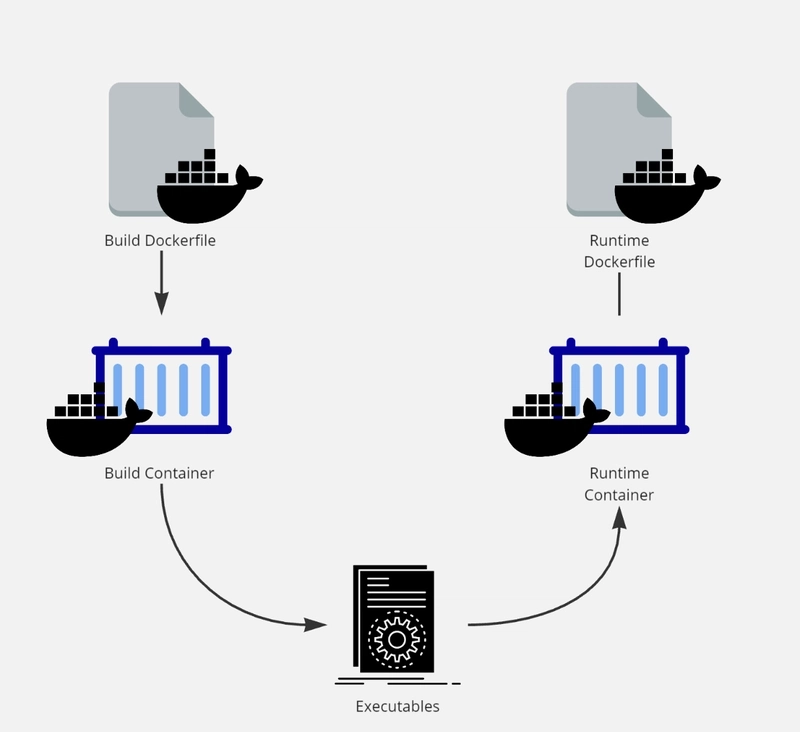 Diagram illustrating the multi-stage Docker build process, showing separation of build and runtime containers (Image from dev.to)
Prometheus Metrics Integration
Expose application metrics for monitoring:
// Express.js example
const prometheus = require('prom-client');
const register = new prometheus.Registry();

// Collect default metrics
prometheus.collectDefaultMetrics({ register });

// Custom business metrics
const httpRequestsTotal = new prometheus.Counter({
  name: 'http_requests_total',
  help: 'Total HTTP requests',
  labelNames: ['method', 'route', 'status']
});

register.registerMetric(httpRequestsTotal);

app.get('/metrics', async (req, res) => {
  res.set('Content-Type', register.contentType);
  res.end(await register.metrics());
});
Container Performance Monitoring
Monitor resource utilization in real-time:
# Real-time container statistics
docker stats --format "table {{.Container}}\t{{.CPUPerc}}\t{{.MemUsage}}\t{{.NetIO}}"

# Historical performance data
docker system events --filter container=myapp
Modern CI/CD Integration
GitHub Actions Implementation
name: Docker Production Deploy

on:
  push:
    branches: [main]
    tags: ['v*']

env:
  REGISTRY: ghcr.io
  IMAGE_NAME: ${{ github.repository }}

jobs:
  build-and-deploy:
    runs-on: ubuntu-latest
    permissions:
      contents: read
      packages: write
      security-events: write

    steps:
      - name: Checkout repository
        uses: actions/checkout@v4

      - name: Set up Docker Buildx
        uses: docker/setup-buildx-action@v3

      - name: Login to Container Registry
        uses: docker/login-action@v3
        with:
          registry: ${{ env.REGISTRY }}
          username: ${{ github.actor }}
          password: ${{ secrets.GITHUB_TOKEN }}

      - name: Extract metadata
        id: meta
        uses: docker/metadata-action@v5
        with:
          images: ${{ env.REGISTRY }}/${{ env.IMAGE_NAME }}
          tags: |
            type=ref,event=branch
            type=ref,event=pr
            type=semver,pattern={{version}}
            type=sha

      - name: Build and push Docker image
        uses: docker/build-push-action@v5
        with:
          context: .
          platforms: linux/amd64,linux/arm64
          push: true
          tags: ${{ steps.meta.outputs.tags }}
          labels: ${{ steps.meta.outputs.labels }}
          cache-from: type=gha
          cache-to: type=gha,mode=max

      - name: Run security scan
        uses: aquasecurity/trivy-action@master
        with:
          image-ref: ${{ env.REGISTRY }}/${{ env.IMAGE_NAME }}:${{ github.sha }}
          format: 'sarif'
          output: 'trivy-results.sarif'

      - name: Upload security scan results
        uses: github/codeql-action/upload-sarif@v3
        if: always()
        with:
          sarif_file: 'trivy-results.sarif'
Performance Optimization Techniques
Build Cache Optimization
Leverage Docker BuildKit for improved build performance:
# Enable BuildKit for parallel builds
export DOCKER_BUILDKIT=1
export BUILDKIT_PROGRESS=plain

# Build with advanced caching
docker buildx build \
  --platform linux/amd64,linux/arm64 \
  --cache-from type=registry,ref=myapp:buildcache \
  --cache-to type=registry,ref=myapp:buildcache,mode=max \
  --push \
  -t myapp:latest .
.dockerignore Optimization
Minimize build context size:
# Ignore unnecessary files
node_modules
.git
.gitignore
README.md
.env
.nyc_output
coverage
.coverage
*.md
.DS_Store
Security Hardening Checklist
Container Security Best Practices:
- ✅ Run containers with non-root users
- ✅ Use read-only filesystems where possible
- ✅ Implement resource limits (CPU, memory)
- ✅ Enable Docker Content Trust for image signing
- ✅ Regular vulnerability scanning in CI/CD
- ✅ Secrets management via external vaults
- ✅ Network segmentation with custom networks
- ✅ Regular base image updates
Common Security Pitfalls to Avoid:
- ❌ Running containers as root
- ❌ Storing secrets in images or environment variables
- ❌ Using :latest tags in production
- ❌ Ignoring security updates for base images
- ❌ Missing resource constraints
- ❌ Exposing unnecessary ports
- ❌ Inadequate logging and monitoring
Real-World Implementation Results
Enterprise implementations of these Docker best practices have demonstrated significant improvements:
- 75% reduction in deployment time through optimized CI/CD pipelines
- 60% smaller production image sizes via multi-stage builds
- Zero critical vulnerabilities in production through automated scanning
- 99.99% uptime achieved with proper health checks and monitoring
- 40% faster development cycles with containerized environments
Conclusion
Docker containerization has evolved from a development convenience to a production necessity. By implementing these best practices—multi-stage builds, security hardening, proper orchestration, and comprehensive monitoring—you create a robust, scalable, and secure container infrastructure that supports modern application demands.
The key to successful containerization lies not just in packaging applications, but in building a complete ecosystem that emphasizes security, observability, and operational excellence. As container technology continues advancing in 2025, these foundational practices ensure your infrastructure remains scalable, secure, and maintainable.