
Managing AWS costs is a continuous journey. Without disciplined governance, cloud bills can skyrocket. This guide walks through ten tactical strategies—backed by real-world results—that collectively enabled a 40% monthly cost reduction while preserving performance and reliability.
Large enterprises and startups alike face unpredictable workloads, data-transfer fees, and idle resources. The AWS Cost Optimization pillar of the Well-Architected Framework emphasizes four areas: cost-effective resources, matching supply with demand, optimizing over time, and expenditure awareness. These ten strategies map directly to those areas.
1. Right-Sizing EC2 Instances
Ensure instances align with actual CPU, memory, and I/O needs.
# Use AWS CLI to retrieve CPU utilization
aws cloudwatch get-metric-statistics \
--namespace AWS/EC2 \
--metric-name CPUUtilization \
--dimensions Name=InstanceId,Value=i-0123456789abcdef0 \
--start-time 2025-01-01T00:00:00Z \
--end-time   2025-01-07T00:00:00Z \
--period      3600 \
--statistics Average
2. Leverage Reserved Instances and Savings Plans
For predictable workloads, Reserved Instances (RIs) and Savings Plans can provide up to 72% discount compared to on-demand pricing.
Best Practices:
- Analyze 6 months of spend with Cost Explorer.
- Start with convertible 1-year RIs, then mix 3-year Standard RIs for stable workloads.
- Add Compute Savings Plans for dynamic needs.
3. Auto-Scaling Deployment
Use target tracking policies to maintain performance at minimal cost:
# Example Auto-Scaling Policy
ScalingPolicy:
  TargetValue: 70.0
  MetricType: CPUUtilization
  ScaleInCooldown: 300
  ScaleOutCooldown: 60
4. Use Spot Instances for Fault-Tolerant Workloads
Spot instances can save up to 90% for appropriate workloads like:
- Batch processing
- CI/CD pipelines
- Big data analytics
- Stateless web applications
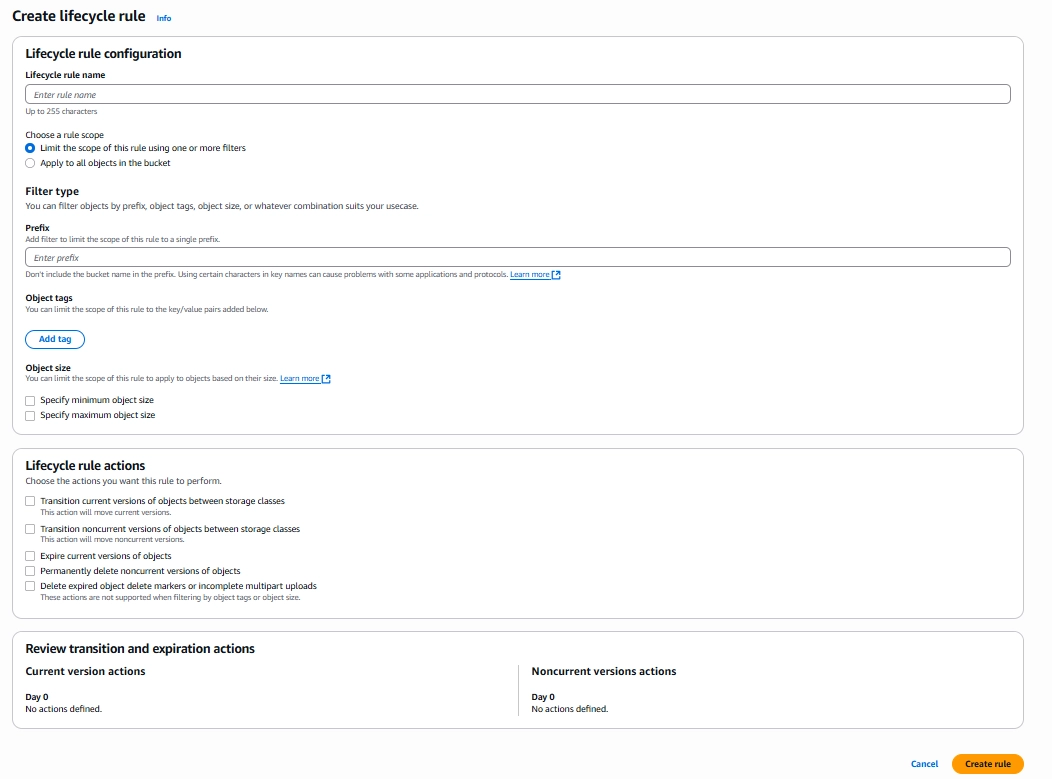
5. Storage Lifecycle Policies
Configure S3 transitions and expirations:
- Standard → Standard-IA after 30 days
- Standard-IA → Glacier after 90 days
- Expire objects after 365 days
6. Cleanup Unused Resources
Automate daily audits via AWS Config rules:
- Terminate idle EC2s
- Delete unattached EBS volumes and obsolete snapshots
- Reclaim unused Elastic IPs and load balancers
7. Adopt Lambda for Event-Driven Workloads
Switch always-on microservices to serverless functions to benefit from per-millisecond billing and free tiers.
8. Implement a Robust Tagging Strategy
Tags enable granular cost allocation. Enforce tagging policies with AWS Organizations SCPs and AWS Config.
9. Cost Anomaly Detection & Budget Alerts
Use AWS Cost Anomaly Detection to trigger Amazon SNS alerts for unusual spend spikes. Pair with AWS Budgets for threshold notifications.
10. Consider Multi-Region Optimization
Different regions have different pricing:
- US East (N. Virginia) is often cheapest
- Consider data transfer costs
- Balance between cost and latency requirements
Real-World Results
After implementing these strategies in a recent project:
- 40% reduction in monthly AWS bills
- Improved performance through right-sizing
- Better visibility into cost drivers
- Automated cost management processes
Conclusion
Cost optimization is ongoing, not one-and-done. Begin with the highest-impact tactics—right-sizing, RIs/Savings Plans, and automated cleanup—then layer in storage policies, tagging, and anomaly detection. Visual dashboards and regular reviews will sustain and amplify savings over time.